Arrow Puzzle 3D - Arrows Out
- 4.8
- Rating
- 500.00K
- Installs
- Free
- Price

 Analysis by App-foxy
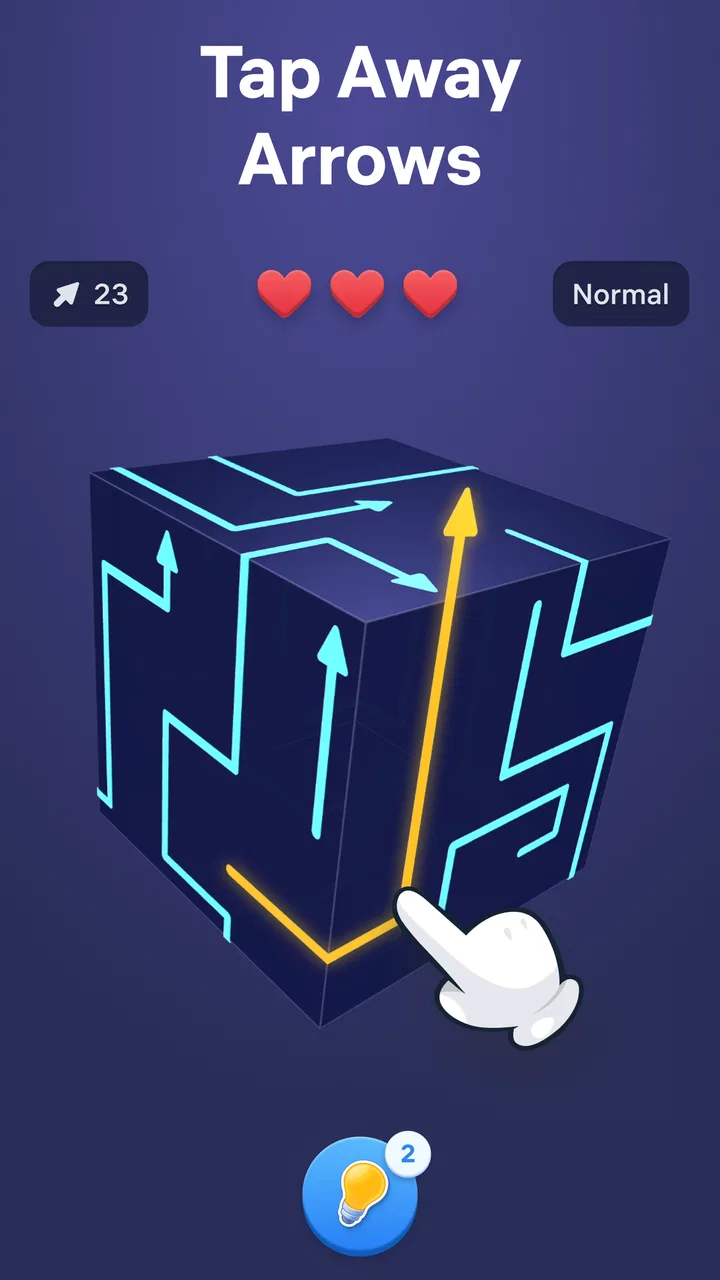
I spent time with Arrow Puzzle 3D - Arrows Out as a casual puzzle game, paying particular attention to how comfortably it works in different everyday situations. Its basic idea is easy to understand: you examine a three-dimensional arrangement of arrow-shaped pieces, tap pieces that can move outward, and gradually clear the structure. The challenge comes from reading the direction of each piece and deciding what must move first.
That simple starting point makes it approachable, but the game is not merely a test of quick tapping. It asks me to rotate the puzzle mentally, notice blocked paths, and plan several moves ahead. I found it most enjoyable when I treated each level as a small spatial problem rather than rushing to remove whatever was immediately available. For anyone looking for a free puzzle game that can fill a few spare minutes without demanding a complicated tutorial, it is an appealing option.
Easybrain is the developer behind this game, which sits in the puzzle category and is suitable for Everyone. It has an average rating of 4.8 from around 50 thousand ratings, with over 500 thousand installs. Those figures suggest that the central concept is connecting with a broad audience, although popularity alone does not guarantee that its visual style or tapping demands will suit every player.
You May Also Like

 Blood Strike: 2.5 Anniversary
Blood Strike’s Loadouts Turn Every Drop Into a Tactical Gamble
A close look at Blood Strike’s custom loadouts: how fast access to signature weapons reshapes its battle royale rhythm, rewards preparation, and narrows the gap between fights.

 Pandora - Music & Podcasts
Pandora’s Music Is Easy to Start, but Harder to Recover
Pandora’s strength is its low-effort path from a seed to a station. Its weak spot is how much confidence it asks you to place in connection, setup, and quiet recovery.

 8 Ball Pool
8 Ball Pool Is Built on Rivalries, Rematches, and Routine
A close look at the rivalries, rematches, shared routines, and unanswered safety questions that turn a quick pool match into a persistent mobile community.

 Samsung Music
Samsung Music’s Quiet Strength Is Playing What You Already Own
Its reach comes less from spectacle than from dependable access to a personal library. That simplicity is both the app’s strongest retention engine and its ceiling.

 AccuWeather: Weather Radar
AccuWeather Review: A Quick, Clear Forecast for Everyday Decisions
For everyday plans, the best forecast is the one you can understand quickly. AccuWeather makes rain timing, radar, and local conditions easy to act on, with a few trade-offs.

 Hill Climb Racing
Why Hill Climb Racing Still Turns Crashes Into One More Run
A tiny car, a bumpy hill and one more upgrade: Hill Climb Racing keeps resurfacing because its simple chaos makes every near-miss feel personal.
More From Our News Desk
View All News


How Arrow Puzzle 3D works in real use
I focus here on the game’s central skill: reading how each arrow sits within a layered arrangement before deciding what to tap. That makes the experience less about speed and more about building a clear picture of the board, a distinction that helps explain both its appeal and its visual demands. Next, I’ll look at how that way of thinking translates into ordinary play.
Readable puzzles and a navigation style that stays simple
The strongest part of the experience is the clarity of the main interaction. I do not have to learn a long list of controls before beginning. The puzzle occupies the focus of the screen, and the goal is communicated through the arrows themselves. When I tap a piece that has a clear route, it moves away; when another piece is blocked, the arrangement gives me a reason to reconsider my choice.
This makes the game relatively easy to pick up for someone who does not normally play puzzle games. The action is visual rather than text-heavy, so a player can understand the broad objective without reading lengthy instructions. That is useful in a household where different people may share a device, including someone who prefers learning by watching the board rather than following written explanations.
At the same time, the three-dimensional presentation can make readability more complicated than the first few moves suggest. Pieces overlap, and an arrow that looks available from one angle may be trapped by another piece. I often had to pause and inspect the whole formation instead of focusing only on the most prominent arrow. This is an important distinction: the game is easy to start, but later decisions depend on interpreting depth and orientation accurately.
I recommend a deliberate viewing routine. Before tapping, I scan the outside edges, identify pieces whose arrow direction points into open space, and then look for pieces that will become available after those moves. This reduces accidental taps and turns the board into a manageable sequence. It is also more comfortable for players who need extra time to process a busy image.
The navigation itself is uncomplicated, which is a benefit for casual play. I can concentrate on the puzzle rather than learning menus or managing a complicated interface. However, anyone expecting a traditional grid-based puzzle with fixed, instantly readable positions may need a short adjustment period. The 3D arrangement creates more visual ambiguity than a flat matching game, and that ambiguity is central to both its appeal and its difficulty.
Motor demands, visual comfort, and sensory load
From a motor perspective, the game mainly asks for individual taps. I did not need rapid swipes or elaborate gestures to understand the core interaction. That makes it more approachable than action-oriented mobile games for players who prefer slower, discrete input. A person using one hand can generally inspect the puzzle and tap a selected piece without having to coordinate several controls at once.
Still, “simple tapping” does not mean the game is effortless for every player. Accurate selection matters. When several arrows are close together, a player with reduced fine-motor control may find it difficult to hit the intended piece consistently. The problem is not speed; it is precision. Playing on a larger screen can help because the pieces are easier to distinguish and the finger is less likely to cover neighboring shapes.
I also found that the game rewards pauses between actions. Tapping repeatedly without checking the result can lead to a poor sequence, while a slower rhythm gives more time to see which pieces have opened a path. That makes the game workable for players who prefer controlled movement, but it may frustrate someone who wants a fast, highly responsive arcade experience.
Visual processing is the bigger consideration. The player needs to distinguish arrow directions, recognize which pieces are in front, and understand the remaining structure after each removal. People who are comfortable with spatial puzzles will probably find this satisfying. Players with difficulty judging depth, tracking overlapping shapes, or distinguishing similar visual elements may experience more friction, especially as the arrangements become denser.
I would approach the game in short sessions if visual concentration becomes tiring. A useful habit is to stop after a level rather than continuing through fatigue, because tired eyes make the arrows and layers harder to interpret. This is one of the less obvious trade-offs of the design: the absence of complicated controls makes it physically approachable, while the 3D layout can still create a demanding visual task.
Sound is not essential to understanding the puzzle, which is helpful when I play in a quiet environment or keep my device muted. The game’s logic is communicated through the board, not through spoken instructions. That means the experience can fit situations where audio is inconvenient, although players who rely on audio cues to supplement visual information may find the visual-first design less supportive.
Why offline-style play fits everyday situations
The store summary presents it as suitable for offline games, and that positioning matches how I would use it: as a compact activity for moments when I do not want a story, a multiplayer match, or a long commitment. It fits a commute, a waiting room, a short break between tasks, or a quiet evening when I want something mentally active but not stressful.
A realistic example is a train journey with an unreliable connection. I can open the game, work through a puzzle at my own pace, and stop when I reach my destination. I do not need to coordinate with another player or remember a complicated narrative. If I am interrupted, the natural structure of individual puzzle attempts makes it easier to return to the task than it would be in a timed competitive game.
That flexibility also helps people whose attention comes in short bursts. I can play for a few minutes, put the phone down, and come back later without feeling that I have missed a team event. The game is less suitable, however, for someone who wants a rich social layer, a persistent story, or a large strategic system that develops over many hours. Its satisfaction comes from solving the current arrangement, not from building a character or managing a world.
The offline focus has another practical advantage: it turns the game into a dependable backup for travel or low-connectivity situations. I would still treat the exact availability of every surrounding store or account feature separately, but the core appeal is clear enough: the puzzle format does not rely on conversation, real-time opponents, or a constant stream of new information to be enjoyable.
Small strategies that make the puzzles more accessible
My first useful strategy is to avoid tapping the most obvious arrow immediately. I look for a piece whose direction points into open space and whose removal will expose several others. This “unlocking” approach reduces unnecessary trial and error. It is especially valuable for players who need to limit repeated movements or who prefer solving through observation rather than experimentation.
My second strategy is to inspect the board from the outside inward. Edge pieces usually provide a clearer view of their direction, while central pieces may be visually obscured. Clearing a visible route first can make the remaining structure easier to read. This is not just a way to solve faster; it lowers the amount of visual information I need to process at once.
A third strategy is to use a reset or retry mindset when a sequence becomes confusing, rather than continuing to tap randomly. The important skill is recognizing when the current plan has stopped making sense. Random tapping can increase frustration and make it harder to remember which pieces were blocked. A calm restart, when available in the play flow, is often more useful than forcing a bad sequence.
I also recommend enlarging the overall viewing area where possible and keeping the device steady on a table if hand stability is an issue. Those are simple environmental changes, but they matter because the game’s challenge comes from precise visual selection. A stable device gives me a clearer view and reduces the chance that a tap lands on a neighboring piece.
These habits reveal an interesting strength: the game can support different pacing styles without changing its basic rules. A quick player can make rapid deductions, while a cautious player can inspect each layer. The limitation is that the game does not transform into a fundamentally different puzzle for a player who cannot comfortably interpret the 3D board. The central visual demand remains unavoidable.
Where it compares well, and where alternatives win
Compared with a classic flat match-three game, this title feels more spatial and less dependent on creating color combinations. I spend more time planning physical routes and less time scanning for identical symbols. That makes it a better choice for someone who enjoys visual ordering and “what can move next?” problems. A match-three alternative is usually more forgiving when I want quick reactions with a familiar board pattern.
Compared with a traditional sliding-block puzzle, this game offers a more immediate interaction because I tap the pieces directly rather than manipulating a single empty space. The 3D presentation also makes the board feel more tactile. On the other hand, a flat sliding puzzle may be easier for a player who finds depth and overlapping shapes tiring, since every tile’s position is usually more explicit.
Compared with a word puzzle, Arrow Puzzle 3D avoids spelling, vocabulary, and language barriers. That can make it attractive in a mixed-language household or for someone who wants a puzzle based on visual reasoning. Word games are a better alternative for players who enjoy clues and linguistic discovery, while this one is more appropriate for people who prefer shapes, direction, and spatial planning.
There is also a difference from fast reflex games. I do not need to chase a timer-driven score to appreciate a level; the reward is finding a clean route through the structure. If I want excitement, competition, or constant movement, another genre will probably be more satisfying. If I want a quiet problem to solve while waiting, this game has the stronger fit.
Practical limitations to consider before installing
The game is free to download, but in-app purchases are listed at $14.99 per item. That is worth keeping in mind before handing the device to a child or allowing unrestricted purchasing. The Everyone age rating makes the game broadly approachable, yet the purchase setting is still a practical household consideration. I would review the device’s purchase protections before treating it as a family game.
The current version is 1.4.0 and it requires Android 8.0 or later. That makes compatibility straightforward for many Android users, but an older device below that operating-system requirement will not be a fit. I would check the phone’s software version before planning to use it on a spare handset, particularly if that handset has not been updated for some time.
The largest gameplay limitation is repetition in the core action. The pleasure comes from clearing one arrangement after another, so players who need a strong narrative arc or a wide variety of mechanics may eventually want something more substantial. I enjoyed the focused design, but I would not describe it as a replacement for a full-length strategy game.
There is also a possible accessibility barrier for players who need large, high-contrast, or highly customizable controls. The game’s basic tap interaction is approachable, but the puzzle depends on reading arrows and overlapping depth. I would not recommend it as a first choice for someone who already knows that 3D visual layouts are difficult to interpret. A flat, slower puzzle with clearer separation between pieces may be kinder in that situation.
For players with limited concentration, the game can be both helpful and demanding. The short puzzle format supports breaks, but the need to maintain a mental map of the board may become tiring. I found that playing in a well-lit environment and avoiding very long sessions made the experience more comfortable. Those are ordinary adjustments rather than special features, but they can determine whether the game feels relaxing or frustrating.
Who I would recommend it to
I would recommend it to someone who likes compact visual challenges, wants an activity that can be played alone, and enjoys solving problems through order and observation. It is particularly suitable for a player who prefers tapping over complex gestures and who appreciates being able to set their own pace. The straightforward premise also makes it easy to show to a friend without explaining a large rulebook.
I would be more cautious about recommending it to someone with significant difficulty judging depth, selecting small neighboring objects, or processing busy visual scenes. I would also point fast-game fans toward another genre, because the appeal here is careful planning rather than adrenaline. Likewise, players looking for social play, character progression, or a story-driven campaign should not expect those needs to be met by this focused puzzle format.
For families, the Everyone rating is reassuring as a general content classification, and the rules are simple enough for different ages to understand. I would still supervise purchasing because paid items are available. For older adults or new smartphone users, the lack of complicated controls may be a plus, but I would first test whether the 3D arrangements remain comfortable to read on the particular device.
My inclusive verdict after playing
Arrow Puzzle 3D succeeds because it turns a small set of actions into a surprisingly thoughtful spatial challenge. I like that I can play quietly, stop easily, and return to the central task without learning a complicated control system. Its visual rules also reduce dependence on language, which broadens its usefulness across different players and situations.
Its inclusiveness has a clear boundary, though. The game is motorically simple but visually demanding. Tapping is not the main obstacle; recognizing direction, depth, and blocked routes is. That distinction matters when deciding whether it will work for a particular person. A player who enjoys 3D visual reasoning may find the layout engaging, while someone who needs a flatter or more adjustable presentation may be better served elsewhere.
Easybrain has made a focused puzzle rather than an all-purpose game. In my experience, that focus is its advantage when I need a calm offline activity for a spare moment, and its weakness when I want variety, social features, or a deeper progression system. The free entry point makes it easy to try, while the purchase option and Android 8.0 minimum are sensible details to consider before installing it on a shared or older device.
My final recommendation is positive, with one important qualification: choose it for deliberate arrow-and-space puzzles, not for universal accessibility or fast entertainment. If that visual style suits you, it provides a clean way to exercise attention and planning in short sessions. The best reason to try it is the balance between simple tapping and genuinely careful spatial thinking; the best reason to skip it is if overlapping 3D pieces are likely to make reading the board tiring rather than enjoyable.
FAQs for Arrow Puzzle 3D - Arrows Out
01What is Arrow Puzzle 3D - Arrows Out?
Arrow Puzzle 3D - Arrows Out is a casual logic game built around clearing a three-dimensional formation of colorful arrows. Each arrow can move only in its pointing direction, so you must study the arrangement, remove unobstructed pieces, and gradually open paths for the remaining ones. The concept is easy to understand, but later levels require careful planning, spatial awareness, and a willingness to undo mistakes.
02How do you play Arrow Puzzle 3D - Arrows Out?
The main objective is to remove every arrow from the puzzle board. Tap an arrow that has a clear route in the direction it is pointing, and it will fly away from the structure. Blocked arrows cannot be removed until surrounding pieces have been cleared. Successful play depends on identifying the correct sequence rather than tapping randomly, because removing one arrow can reveal new options while an incorrect move may leave the puzzle difficult to finish.
03Is Arrow Puzzle 3D - Arrows Out suitable for beginners?
Yes, the game is generally accessible to beginners because its controls are simple and the early puzzles introduce the movement rules gradually. You do not need previous experience with strategy games or complex controls. However, the challenge increases as formations become more crowded and viewpoints make the arrangement harder to read. Players who enjoy short brain-training sessions, visual puzzles, and relaxed problem-solving should find the learning curve manageable.
04Does Arrow Puzzle 3D - Arrows Out require an internet connection?
The basic puzzle experience is designed to be convenient for quick play, and many stages may be available without a constant connection, depending on the version installed and the platform's current requirements. An internet connection can still be needed for advertisements, optional rewards, cloud-related features, updates, or purchases. If offline access is important to you, check the latest store description and test the game after temporarily disabling mobile data or Wi-Fi.
05Are there ads or in-app purchases in Arrow Puzzle 3D - Arrows Out?
Like many free-to-download mobile puzzle games, Arrow Puzzle 3D - Arrows Out may include advertising and optional in-app purchases. Ads can appear between stages or when you choose bonus rewards, while purchases may offer hints, extra tools, or an ad-removal option, depending on the release. The game can usually be enjoyed without spending money, but users who dislike interruptions should review the pricing and purchase details before downloading.
Pros
- Simple swipe controls are easy to learn within seconds.
- 3D arrow layouts provide a satisfying visual puzzle experience.
- Short levels make it suitable for quick gaming sessions.
- Gradual difficulty offers a comfortable learning curve.
- Works well for players who enjoy relaxing
- non-action gameplay.
Cons
- Some puzzles may feel repetitive after extended play.
- Later levels can become frustrating without careful planning.
- The 3D perspective may make certain arrows harder to read.
- Frequent advertisements may interrupt the gameplay flow.
- Limited variety in mechanics can reduce long-term replay value.

Arrow Puzzle 3D - Arrows Out
Gallery